Server-Side Tracking: What Small Businesses Need to Know
If you’re running traditional analytics, you’re probably missing a significant chunk of your data. Ad blockers, browser restrictions, and privacy features now prevent 30-40% of tracking scripts from ever firing. For small businesses making decisions based on this incomplete picture, the consequences are real — wasted ad spend, wrong conclusions, missed opportunities.
Server-side tracking offers a way out of this data blind spot. Instead of relying on visitors’ browsers to send data, you process tracking on your own server first. The result? More complete data, better privacy control, and analytics that actually reflect reality.
But server-side tracking isn’t magic, and it’s not for everyone. This guide explains what it is, how it works, when small businesses actually need it, and what it won’t solve.
What Is Server-Side Tracking?
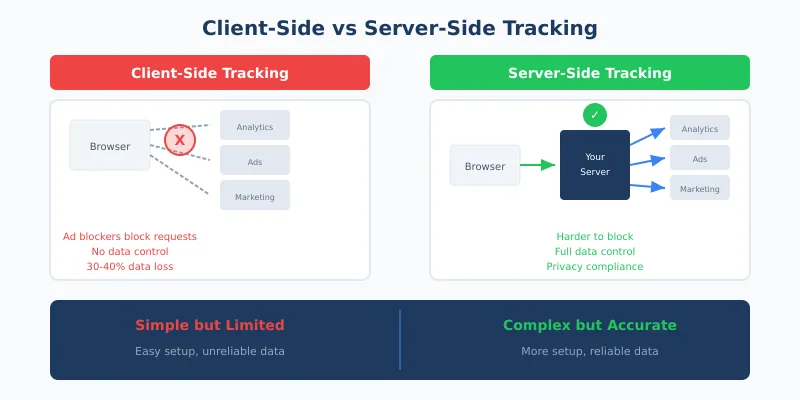
Traditional web analytics — often called client-side tracking — works by placing JavaScript code in visitors’ browsers. When someone visits your site, their browser executes this code and sends data directly to analytics platforms, ad networks, and other third parties.
Server-side tracking changes this flow. Instead of the browser communicating directly with third parties, it sends data to your server first. Your server then processes, filters, and forwards that data to whatever platforms you use.
Here’s the key difference:
| Aspect | Client-Side Tracking | Server-Side Tracking |
|---|---|---|
| Where code runs | Visitor’s browser | Your server |
| Data flow | Browser → Third parties directly | Browser → Your server → Third parties |
| Ad blocker impact | Often blocked | Harder to block |
| Data control | Limited — third parties receive raw data | Full — you control what’s sent |
| Setup complexity | Simple — paste code snippet | More complex — requires server configuration |
| Cost | Usually free | Server costs + setup time |
Think of it this way: with client-side tracking, you’re asking visitors to deliver your mail. With server-side tracking, you’re picking it up yourself and deciding what to forward where.
Why Server-Side Tracking Matters Now
The web has changed dramatically in recent years. What worked for analytics in 2018 barely functions in 2026. Several converging trends have made server-side tracking increasingly relevant:
Ad Blockers Are Everywhere
Over one billion users now run ad blockers, and that number keeps growing. Most blockers don’t just hide ads — they prevent tracking scripts from loading entirely. If your analytics rely purely on client-side code, these visitors are invisible to you.
Browser Privacy Features Block Tracking
Safari’s Intelligent Tracking Prevention limits cookies to 7 days when set by JavaScript. Firefox blocks third-party cookies by default. Chrome is giving users more control over tracking. These aren’t edge cases anymore — they represent the majority of web traffic.
iOS Changes Hit Hard
Apple’s App Tracking Transparency and related iOS changes have reduced the data available to advertisers significantly. While this primarily affects mobile apps, the ripple effects touch web analytics too, particularly for businesses with mobile-heavy audiences.
Privacy Regulations Require More Control
GDPR, CCPA, and newer regulations like Canada’s updated privacy law (CPPA) require businesses to know exactly what data they collect and where it goes. With client-side tracking, dozens of third-party scripts might fire without your full knowledge. Server-side tracking gives you a single point of control to audit and manage data flows.
For context on how these regulations affect your analytics approach, see our overview of the global privacy landscape for analytics.
How Server-Side Tracking Actually Works
Let’s walk through the technical flow without getting lost in implementation details. Understanding the concept helps you evaluate whether it’s right for your business.
The Basic Flow
- Visitor action — Someone visits your site, clicks a button, or completes a purchase
- Browser sends event — A minimal script captures the action and sends it to your server (not directly to third parties)
- Server receives data — Your server endpoint captures the raw event data
- Server processes — You enrich, filter, or anonymize the data as needed
- Server forwards — Clean data goes to your analytics platform, ad networks, or other services
The critical difference is step 3 and 4. You now sit in the middle of the data flow, able to see and control everything before it leaves your infrastructure.
What You Can Do in the Middle
This intermediary position enables several valuable actions:
- Strip personal data — Remove or hash IP addresses before forwarding
- Enforce consent — Only forward data for users who’ve actually consented
- Enrich events — Add server-side information like user segments or order values
- Deduplicate — Prevent the same conversion from being counted multiple times
- Validate — Filter out bot traffic before it pollutes your analytics
This level of control is impossible with pure client-side tracking, where data goes directly from the browser to third parties without your involvement.
The Real Benefits for Small Businesses
Marketing materials for server-side tracking often focus on enterprise use cases. But there are genuine benefits for smaller organizations too — if you know what to look for.
Benefit 1: Recover Lost Data
The most immediate benefit is data recovery. If 30-40% of your tracking is blocked, your analytics are systematically wrong. Server-side tracking can recover much of this missing data because:
- Requests go to your domain, not obvious tracking domains that blockers target
- You control the request format, making it harder to pattern-match and block
- First-party server endpoints aren’t on standard blocking lists
In my experience, businesses typically see 15-25% more conversions tracked after implementing server-side tracking properly. For paid advertising, this isn’t just about reporting accuracy — it feeds better data back to ad platform algorithms, improving targeting and reducing wasted spend.
Benefit 2: Better Privacy Control
With client-side tracking, you’re often trusting third-party scripts to behave properly. In reality, many scripts collect more data than documented, share information with fourth parties, or ignore consent signals.
Server-side tracking puts you in control. You can:
- Audit exactly what data leaves your infrastructure
- Enforce consent decisions at the server level (not trusting client scripts to honor them)
- Keep data within specific geographic regions for compliance
- Prove your data practices in case of regulatory inquiry
This connects directly to first-party data strategies — server-side tracking is often a key component of owning your data pipeline.
Benefit 3: Faster Page Loads
Every client-side script adds weight to your pages. Analytics tags, conversion pixels, remarketing scripts — they accumulate. Server-side tracking lets you reduce client-side JavaScript significantly, improving page load times.
Faster pages mean better user experience, lower bounce rates, and improved search rankings. For small businesses competing against larger players, site speed is one area where you can genuinely outperform. For more on this connection, see our article on website speed and how to measure it.
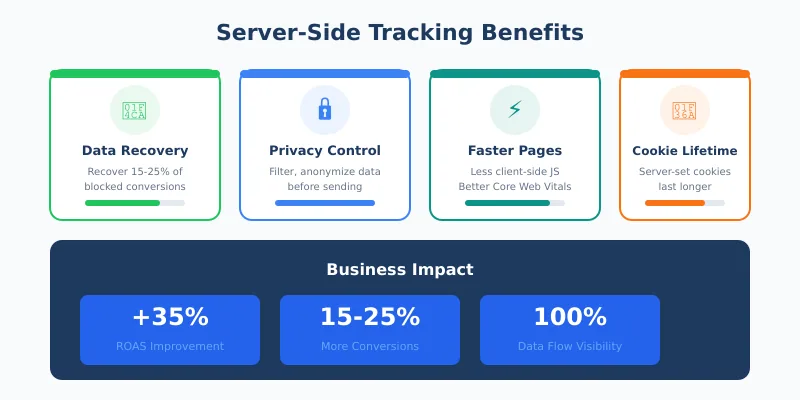
Benefit 4: Extended Cookie Lifetime
Safari and other browsers limit JavaScript-set cookies to 7 days. Server-set cookies (first-party, set via HTTP response) can last longer. This means better recognition of returning visitors and more accurate attribution windows.
However, this isn’t about circumventing user preferences. If someone clears cookies or uses private browsing, that choice should be respected. Extended cookie lifetime helps with legitimate use cases like recognizing customers who return after a week to complete a purchase.
Server-Side vs Client-Side: When Each Makes Sense
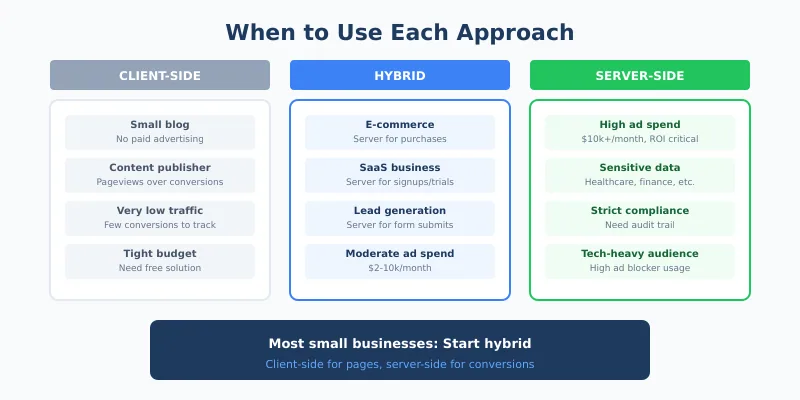
Server-side tracking isn’t universally better. Each approach has its place, and many businesses benefit from a hybrid approach.
| Scenario | Best Approach | Why |
|---|---|---|
| Small blog, no ads | Client-side | Simple setup, low stakes if data is incomplete |
| E-commerce, significant ad spend | Server-side or hybrid | Attribution accuracy directly affects ROI |
| SaaS with free trials | Hybrid | Trial-to-paid conversion tracking is critical |
| Lead generation | Server-side for conversions | Form submissions are high-value events |
| Content publisher | Client-side often sufficient | Page views matter less than conversions |
| Handling sensitive data | Server-side | Privacy control is non-negotiable |
The hybrid approach is often most practical: use client-side for basic page analytics, but route high-value events like purchases and signups through server-side tracking for maximum accuracy.
Common Misconceptions About Server-Side Tracking
Server-side tracking generates confusion and unrealistic expectations. Let’s address the most common misconceptions.
Misconception 1: “It Bypasses the Need for Consent”
This is dangerously wrong. Server-side tracking changes where data is processed, not whether consent is required. Under GDPR and similar laws, you need user consent for tracking regardless of the technical implementation.
What server-side tracking does help with is enforcing consent properly. You can ensure that no tracking data is forwarded for users who haven’t consented, even if a buggy client-side script fires anyway.
Misconception 2: “It Eliminates Cookies Entirely”
Server-side tracking typically still uses cookies. The difference is how and where they’re set. First-party cookies set by your server aren’t blocked like third-party cookies are, but they’re still cookies.
Some server-side approaches use cookieless methods for certain data points, but completely cookie-free tracking usually means accepting less functionality, like the inability to recognize returning visitors.
Misconception 3: “It’s Invisible to Users”
Users who want to avoid tracking can still do so. Browser fingerprinting protections, VPNs, and privacy-focused browsers can all limit server-side tracking effectiveness. The goal shouldn’t be to track unwilling users — it’s to accurately track users who’ve consented.
Misconception 4: “It’s Only for Large Companies”
Server-side tracking has become more accessible. Managed solutions handle the infrastructure complexity, and the cost can be reasonable for businesses with meaningful ad spend. If you’re spending $5,000+ monthly on advertising, the improved attribution often pays for the server costs multiple times over.
What It Costs (Realistically)
Let’s be practical about the investment required:
| Component | DIY Approach | Managed Solution |
|---|---|---|
| Server infrastructure | $20-100/month (cloud hosting) | Included in service fee |
| Setup time | 20-40 hours (technical expertise required) | 2-5 hours (configuration only) |
| Ongoing maintenance | 5-10 hours/month | Minimal |
| Service fee | $0 | $50-500/month depending on volume |
For most small businesses without dedicated technical staff, managed solutions make more sense despite the monthly fee. The time saved on setup and maintenance typically justifies the cost.
The business case strengthens as ad spend increases. If server-side tracking recovers 20% more conversions and you’re spending $10,000/month on ads, the improved data feeding back to ad algorithms can easily generate enough ROAS improvement to cover costs many times over.
Implementation Considerations
If you’re considering server-side tracking, here’s what to think through:
Start With High-Value Events
You don’t need to route everything through server-side tracking immediately. Start with conversions — purchases, signups, lead form submissions. These are the events where accuracy matters most and where ad platform algorithms benefit from better data.
Maintain Your Consent Framework
Server-side tracking should integrate with your existing consent management. When a user rejects tracking in your consent banner, your server should respect that decision and not forward data to tracking platforms.
Test Before Going Live
Run server-side tracking in parallel with client-side for a period. Compare the data. You should see more events captured server-side, but the patterns should be consistent. Major discrepancies indicate configuration issues.
Monitor Server Performance
Your tracking server becomes a critical piece of infrastructure. If it goes down, you lose data. Ensure you have monitoring and alerts in place, or choose a managed solution with reliability guarantees.
Document Your Data Flows
One advantage of server-side tracking is knowing exactly where data goes. Document this. It helps with privacy compliance, debugging issues, and onboarding new team members.
When Small Businesses Should Wait
Server-side tracking isn’t always the right next step. Consider waiting if:
- You don’t run paid advertising — The biggest benefit is improved attribution for ad platforms
- Your traffic is very low — Statistical significance matters less when you have few conversions
- You haven’t set up basic analytics properly — Fix fundamentals before adding complexity
- Budget is extremely tight — The ROI is real but requires upfront investment
- You don’t have a consent framework — Get compliant first, then optimize data collection
Server-side tracking amplifies good analytics practices. If your foundation is shaky, address that first.
Continue Learning
Explore more about building accurate, privacy-respecting analytics:
- The Hidden Cost of Spam Traffic — Server-side validation can help filter bots before they pollute your data
- Beyond Pageviews: Advanced Metrics — Focus on the events worth tracking accurately
- Tracking Unique Visitors — How extended cookie lifetime affects visitor recognition
Bottom Line
Server-side tracking isn’t a silver bullet, but it solves real problems that affect real business decisions. If you’re making significant investments in paid advertising, the data recovery alone often justifies the cost. If you’re handling sensitive customer data, the privacy control is invaluable.
For small businesses, the path forward is usually pragmatic: start with client-side tracking for general analytics, then add server-side tracking for high-value conversion events where accuracy directly impacts revenue. This hybrid approach captures most of the benefits without requiring a complete infrastructure overhaul.
The web will keep evolving toward more privacy. Ad blockers will keep growing. Browser restrictions will keep tightening. Server-side tracking isn’t about fighting these trends — it’s about building measurement that works within them while still giving you the insights you need to grow.
The question isn’t whether to track on the server eventually. It’s whether your business is ready for that investment today.