UTM Campaign Tracking: Label Your Links, Know What Works
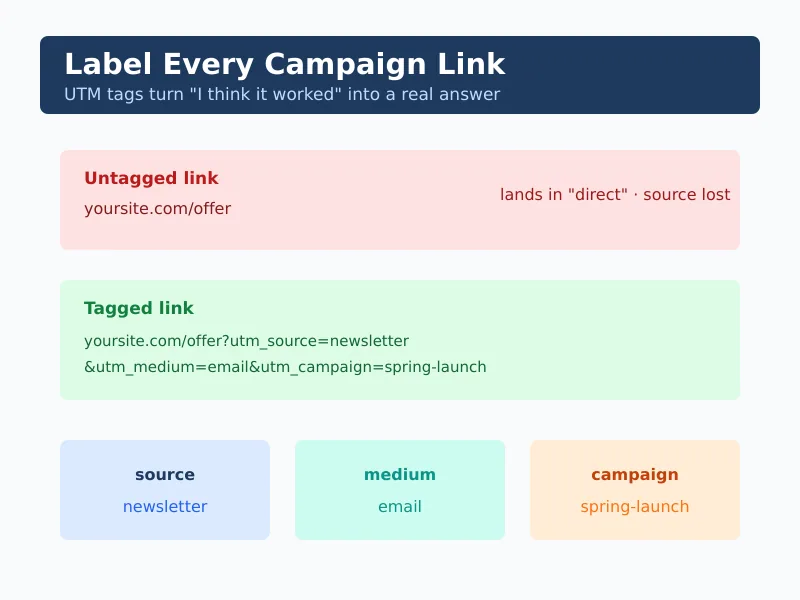
You spend hours planning a campaign, then drop a bare link into an email and a few posts. A week later you can’t tell which one actually worked — they all blurred into “direct” traffic. UTM campaign tracking fixes that in about five seconds per link. It’s the simplest, most underused trick in analytics, and it costs nothing but a habit.
In my experience, the gap between teams who know what’s working and teams who guess almost always comes down to tagging discipline. The data was never missing. It was just unlabelled. This guide shows what UTM parameters are, how to build them so they stay consistent, and how to avoid the mistakes that turn good data into a mess.
What UTM Parameters Actually Are
A UTM parameter is a small tag you add to the end of a link so your analytics knows where the click came from. They’re just text in the URL — nothing is installed, and no personal data is collected. The visitor’s browser passes the label along, and your reports group clicks by it.
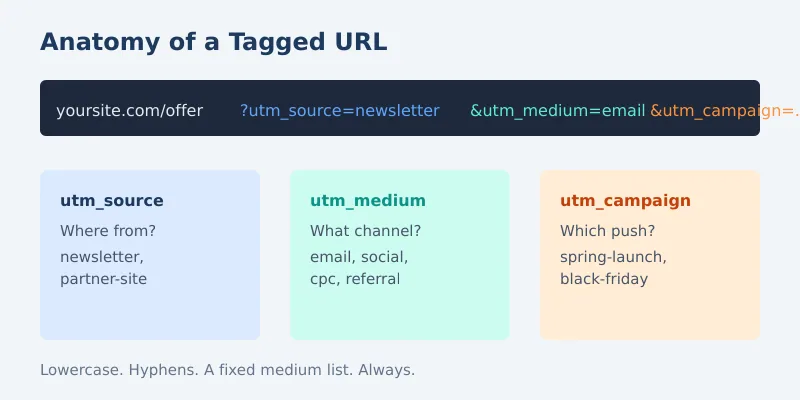
There are five standard parameters. Three you should always use; two are optional. Here’s what each one answers.
| Parameter | Answers | Example value |
|---|---|---|
utm_source | Where is the traffic from? | newsletter |
utm_medium | What type of channel? | |
utm_campaign | Which campaign? | spring-launch |
utm_content | Which link or variant? (optional) | header-button |
utm_term | Which keyword? (optional) | privacy-analytics |
A finished tagged link looks like this: yoursite.com/offer?utm_source=newsletter&utm_medium=email&utm_campaign=spring-launch. That’s it. The page loads normally; your reports just gain a label.
Related: clean tags are what stop campaign clicks from leaking into the direct traffic bucket and hiding your best channels.
Why Consistency Beats Cleverness
UTM tracking breaks for one reason above all others: inconsistency. Analytics treats Email, email, and e-mail as three different mediums. Suddenly your “email” channel is split across three buckets and none of them tells the truth.
So before you tag a single link, write down your conventions and never deviate. A one-page naming guide saves hours of cleanup later.
- Lowercase everything. Always. No exceptions.
- Use hyphens, not spaces or underscores.
spring-launch, neverSpring Launch. - Keep a fixed list of mediums: email, social, cpc, referral, affiliate. Don’t invent new ones casually.
- Name campaigns predictably: a date or theme everyone recognises.
- Document it once, share it, and stick to it.
A Simple Tagging Workflow
You don’t need software for this, though a shared spreadsheet helps. Follow the same five steps every time and your data stays clean for years.
- Decide the campaign name first. Everything else hangs off it.
- Set source and medium from your fixed list. Never freestyle these.
- Add utm_content only when you’re testing two versions of the same link.
- Build the link in one place — a spreadsheet row or a builder — so it’s reusable.
- Log every tagged link in a shared sheet so the whole team uses the same labels.
That shared log is the secret. When two people tag links for the same campaign without it, you get spring-launch and springlaunch and the data fragments. One source of truth prevents the whole problem.
Tag once, tag consistently, and log it. Future-you will be able to answer “what worked?” in seconds.
When Not to Use UTMs
UTMs are great, but they’re not for every link. Misusing them creates the exact mess they’re meant to prevent.
- Never tag internal links. Tagging a link between your own pages resets the visitor’s original source and erases where they really came from.
- Don’t tag organic search results. Search engines handle that channel automatically.
- Don’t put sensitive data in a UTM. The tag is visible in the URL — keep it generic, never personal.
- Skip them on links you’ll never analyse. A tag you don’t read is just clutter.
That third point matters for privacy. Because UTM values sit in plain sight in the address bar, they should describe the campaign, never the person. Keeping tags generic aligns with the GDPR’s data-minimisation principle, and the UK ICO publishes guidance worth a read if you operate in the UK. For the official definitions behind these parameters, the reference documentation is a useful anchor.
Continue Learning
Explore more about clean, privacy-first measurement:
- Understanding Traffic Sources — what your tagged links roll up into.
- Web Analytics Segmentation — slice tagged campaigns by device and channel.
- Tracking CTA Button Performance — measure the clicks your campaigns drive on-site.
Bottom Line
UTM campaign tracking turns “I think the email worked” into “the email drove 40% of conversions.” It takes seconds per link and needs no tools or personal data. Use the three core parameters consistently, log every tagged link in one place, and never tag internal or organic links. Get the habit right once and every campaign you run afterwards reports on itself.
The data was always there. UTMs just give it a name.